There are two types of primary memory: Random Access Memory (RAM) and Read Only Memory (ROM).
The features of Random Access Memory (RAM) are:
– It is volatile (the contents of the memory are lost when the power to the RAM is turned off)
– It is used to store data, files , or parts of the operating system that are currently in use
– It can be written to or read from and the contents of the memory can be changed.
In general, the larger the size of RAM the faster the computer will operate. RAM is much faster to write to or read from than other types of memory, but its main drawback is its volatility.

There are two types of RAM technology:
1. Dynamic RAM (DRAM) chip consists of a number of transistors and capacitors.
– Capacitor – this holds the bits of information (0 or 1)
– Transistors – this acts like a switch; it reads and changes the capacitor’s value as necessary.
Each of these parts is tiny since a RAM chip consists of millions of transistors and capacitors.
DRAM needs to be constantly refreshed (that is, the capacitor needs needs to be recharged every 15 microseconds otherwise it would lose its value). If it wasn’t recharged, the capacitors charge would leak away very quickly, leaving every capacitor with the value of 0
2. Static RAM (SRAM) chip does not need to be constantly refreshed – but is more expensive and power hungry than DRAM. Since SRAM provides much faster access to data, it is used for the computer’s cache memory. This is used to store program instructions that are frequently re-referenced by software during operation.
The features of Read Only Memory (ROM):
– It is a permanent memory (the contents of the memory remain even when the power of the ROM is turned off)
– It is used to store the start-up instructions when the computer is first switched on (for example, ROM might store basic input/output system (BIOS))
– The data or contents of a ROM chip can only be read; they cannot be changed.

Application…
A microwave oven, for example, contains both RAM and ROM chips:
ROM
– stores the factory settings such as the start-up routines when it is first switched on
– stores the different preset cooking options, including temperature and time to cook.
RAM
– the user may choose to program in their own routines; these new instructions would be stored in the RAM chip.
Secondary storage can refer to Hard Disk Drives (HDD) and Sold-State Drives (SSD).
Hard disk drives (HDD) are the most common method used to store data on a computer. Data is stored in a digital format on magnetic surfaces of the disks. These disks are known as platters serve to read-write data and can spin at around 7000 times a second.
Unfortunately, hard disk drives have very slow data access when compared to, for example, RAM. The latency, i.e. the amount of time it takes for a specific block of data to be processed by the read-write head, can be significant.

Hard disk drive (HDD)
Solid-state drives remove the problem of latency significantly. They have no moving parts and all data is retrieved at the same rate. There are two types of solid-state drives: Flash (use NAND chips) and EEPROM (use NOR chips).

Solid-state drive (SSD)
Flash is the most common type of solid-state storage device, which store data by controlling the movement of electrons within NAND chips. The data is stored as 0s and 1s in millions of tiny resistors within the chip. This effectively produces a non-volatile rewritable memory.
Electronically erasable programmable read-only memory (EEPROM) technology on the other hand, uses NOR chips instead of NAND and is the more expensive option of the two. The main difference is that EEPROM is faster in operation and allows data to be read or erased a single byte at time, whereas NAND only allows blocks of data to be read or erased.
There are several benefits to using SSD technology rather than HDD:
– they are more reliable (no moving parts to go wrong)
– they are lighter & thinner (therefore more suitable for laptops)
– they have a lower power consumption
– data is accessed considerably faster than HDD.
The main disadvantage of SSD is the questionable longevity of the technology. For this reason, SSD technology is not used in servers, for example, where a huge number of write operations take place every day.
In modern personal computers, most offline-storage is also used as secondary storage. The main difference between the two terms is in how these storage devices are used. Whereas secondary storage is fixed into the computer for long term use (e.g. as is usually the case with hard disk drives), offline-storage is used mainly as a transfer medium and accessed as per need only. The key advantage of off-line storage is that if there is a disaster, e.g. a fire, that destroys the computer, the off-line storage will be unaffected if it is held in a remote location. It is also a relatively cheap medium for archiving information that is rarely used. Examples of off-line storage include:
- CD/DVD/DVD-RAM (optical storage systems)
- Blu-ray disks (optical storage systems)
- USB flash memory/memory sticks/SD-XD cards (sold state storage systems)
- Removable/external hard disk drives (magnetic storage systems).
CD/DVD disks are described as optical storage devices. Laser light is used to read data and to write data in the surface of the disk. The data is stored in ‘pits’ and ‘bumps’ on the spiral track. DVD-RAM uses a very different technology – instead of a single spiral track, they use a number of concentric tracks, which allow simultaneous read and write operations to take place.

Blu-ray disks are another example of optical storage media. However, they are fundamentally different from CD/DVDs and DVD-RAM because they use a blue laser instead of a red laser. This means that the ‘pits’ and ‘bumps’ can be much smaller, and as a result, they store up to five times more data than a normal DVD.

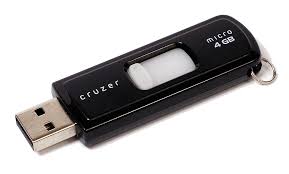
USB flash memories, also known as memory sticks and pen drives, use solid-state technology. They usually connect to a computer through the USB port. As they are very small and lightweight, their main advantage is their suitability for transferring files between different computers. They can also be used as small back-up devices for archived files such as music or photos, for example. Digital cameras use a slightly different form of solid-state memory, known as XD (eXtreme Digital) or SD (Secure Digital) cards. The technology is the same as memory sticks. They are made up of NAND chips and, as with all solid-state memories, there are no moving parts.
Removable hard disk drives are essentially HDD but can be connected to the computer using one of the USB ports. In this way, they can be used as a back-up device or as another medium for transferring files between computers.
